|
|
|
|
|
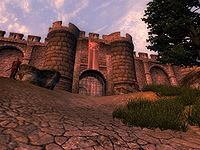
The entrance to Battlehorn Castle
|
Quick Walkthrough[edit]
- After installing the plug-in, a rumor appears about a battle at Battlehorn Castle.
- Go to Battlehorn Castle and lift the siege on it by killing the marauders.
- Visit Nilphas Omellian to purchase upgrades for Battlehorn Castle.
- Go back to Battlehorn Castle and wait until a guard gives you a note about a Dwemer forge upgrade.
- Finish purchasing upgrades from Nilphas Omellian.
Detailed Walkthrough[edit]
Break the Siege[edit]
After installing the plug-in and loading the game, you will hear a rumor that Battlehorn Castle is under siege by marauders. This castle is located west of Chorrol. It can be reached by traveling west from the North Country Stables. Upon arriving at the castle you will find four marauders attacking it. Help out the outnumbered knights and kill the marauders. Of the four marauders besieging the castle, one is a male Nord marauder, one a female Imperial archer, one a male Altmer battlemage, and one a female Imperial Warlord.
Lord of the Castle[edit]
After your victory you are told that Lord Kelvyn, the lord of the castle, died in the battle (his corpse can be found in front of the gate as you first arrive) and as a result of his will, the castle is given to you. You are then told to purchase upgrades from Nilphas Omellian at The Merchants Inn in the Imperial City. He will give you a list of all the available upgrades. After purchasing at least one of them and returning to the castle, a guard will arrive with a note from Nilphas Omellian, saying that he has acquired a Dwemer forge. After you have purchased all of the upgrades Nilphas has for sale, including the Dwemer forge, the quest will officially be complete. However, a little exploration will lead to another (though unmarked) quest.
- The Mystic Emporium page bugs section describes a fairly serious bug affecting that shop when the plug-in for this quest is installed.
Quest Stages[edit]
| Battlehorn Castle (DLCBattlehornCastle) |
| Stage |
Finishes Quest |
Journal Entry |
| 10 |
|
I've heard a rumor that the defenders of Battlehorn Castle are besieged by marauders and are appealing for aid. Apparently their commander has been killed, and they're offering the castle itself to anyone who will help lift the siege. |
| 18 |
|
(Player arrives at castle -- trigger battle) |
| 20 |
|
(Player closer to castle -- trigger boss to open gate) |
| 25 |
|
(Gate is open) |
| 28 |
|
(All attackers are dead) |
| 30 |
|
The marauders who were attacking Battlehorn Castle have been defeated, and the grateful survivors have granted me the deed to the castle. I've learned that I can purchase everything I need to restore Battlehorn Castle to its former glory from Nilphas Omellian at the Merchants Inn in the Market District of the Imperial City. |
| 40 |
|
(Adds forge to vendor when you buy one thing and cleans up bodies from battle) |
| 45 |
|
(Set when you buy forge, or get message about it) |
| 50 |
|
I received a note from Nilphas Omellian, offering to install an ancient Dwemer Forge in Battlehorn Castle for 3000 [sic] gold. (See bugs for details about the price.) |
| 60 |
|
(Bear trophy created) |
| 61 |
|
(Wolf trophy created) |
| 62 |
|
(Minotaur trophy created) |
| 63 |
|
(Lion trophy created) |
| 64 |
|
(Ogre trophy created) |
| 65 |
|
(Clannfear trophy created) |
| 66 |
|
(Daedroth trophy created) |
| 67 |
|
(Troll trophy created) |
| 70 |
|
(All trophies created) |
| 80 |
|
(Set when you purchase the kitchen) |
| 81 |
|
(Set when you purchase wine cellar) |
| 90 |
|
|
| 100 |
Yes |
I've now purchased everything Nilphas Omellian had available for Battlehorn Castle. |
- Notes
- Not all Journal Entries may appear in your journal; which entries appear and which entries do not depends on the manner in which the quest is done.
- Stages are not always in order of progress. This is usually the case with quests that have multiple possible outcomes or quests where certain tasks may be done in random order.
- If an entry is marked as "Finishes Quest" it means the quest disappears from the Active Quest list, but you may still receive new entries for that quest.
 It is possible to use the console to advance through the quest by entering
 setstage DLCBattlehornCastle stage, where stage is the number of the stage you wish to complete. It is not possible to un-complete (i.e. go back) quest stages. See SetStage for more information.




![[Content is available under Attribution-ShareAlike]](http://en.uesp.net/w/images/4/4d/Somerights.png)
