|
|
|
|
|
Receive your reward for saving the world. |
|
|
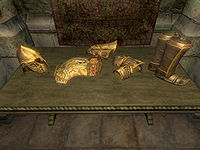
The armor ready for collection
|
Quick Walkthrough[edit]
- Talk to Ocato.
- Wait two weeks.
- Go to the Imperial Legion Armory in the Prison District.
- Pick up your reward, a suit of Imperial Dragon Armor.
Detailed Walkthrough[edit]
The Champion of Cyrodiil[edit]
After the cinematic of defeating Mehrunes Dagon finishes, Ocato rushes in and realizes what has transpired. Although he is concerned over what will become of the Empire, he is grateful that (almost) everyone survived and names you the Champion of Cyrodiil, a title only six other heroes have received in the history of the Empire. Ocato orders a suit of Imperial Dragon Armor for you, which is normally only worn by the Emperor, and says the armor will be ready in two weeks.
Pick up the Armor[edit]
For two weeks, nothing happens in this quest and it has no quest arrow. After two weeks, your journal will automatically update telling you that your armor is ready. If you make it your active quest, you'll be directed to the Armory in the Prison District. Your new armor is on the table opposite the door.
There are two different versions of the armor: one set of light armor and one set of heavy armor. You cannot choose which set you receive; the game decides for you based upon your skill in Light Armor and Heavy Armor. You will get the suit that corresponds to your stronger skill; if the two skills are equal, you will get the heavy armor suit. The decision is based upon the actual skill levels (not the base skill levels) at the moment that you get the quest update telling you that your armor is ready, and hence can be influenced by Drain Skill and Fortify Skill effects.
Picking up any piece of your new suit of armor completes the quest, and also completes Oblivion's Main Quest. Congratulations!
- The Imperial Dragon Armor looks the same as that which Martin wore at the battle of Bruma, assuming you did not trigger the Miscarcand bug.
- The heavy armor and light armor sets have the same appearance.
- There is no female version of the armor, meaning that both genders look the same while wearing it.
- There is a chance that after 2 weeks the quest will not update.
Journal Entries[edit]
| Imperial Dragon Armor (MQDragonArmor) |
| Stage |
Finishes Quest |
Journal Entry |
| 10 |
|
Chancellor Ocato has ordered a suit of Imperial Dragon armor forged for me in gratitude for the services I rendered to the Empire during the Oblivion Crisis. It will be waiting for me at the armory in the Imperial Legion Compound in two weeks. |
| 20 |
|
The Imperial Dragon armor ordered for me by Chancellor Ocato should be ready. I can pick it up from the armory in the Imperial Legion Compound. |
| 30 |
Finishes quest |
I received the Imperial Dragon armor that Chancellor Ocato had forged for me. |
- Notes
- Not all Journal Entries may appear in your journal; which entries appear and which entries do not depends on the manner in which the quest is done.
- Stages are not always in order of progress. This is usually the case with quests that have multiple possible outcomes or quests where certain tasks may be done in random order.
- If an entry is marked as "Finishes Quest" it means the quest disappears from the Active Quest list, but you may still receive new entries for that quest.
 It is possible to use the console to advance through the quest by entering
 setstage MQDragonArmor stage, where stage is the number of the stage you wish to complete. It is not possible to un-complete (i.e. go back) quest stages. See SetStage for more information.


 The
The 
![[Content is available under Attribution-ShareAlike]](http://en.uesp.net/w/images/4/4d/Somerights.png)
